

What’s new in Revive Adserver v6.0
Summary:
We detail the improvements in v6.0: major speed increases for statistics reports, a versatile new Mailer plugin, enhanced security checks for banner uploads, and a smooth loading animation. We also ensured vital compatibility with current PHP versions.
Introduction
A few weeks ago, we released version 6.0 of our Revive Adserver software. There was a blog post with the release notes, also pointing to a change log, but that was all fairly technical and abbreviated.
In this blog post, we’re going to take a closer look at some of the new features, improvements, and changes that stand out the most in the new version.
Covered in this blog post:
- We optimized some database queries used in the statistics screens, resulting in faster response times for a number of on-screen reports, especially on very large databases.
- We added a loading animation when the next screen is taking some time to load, so that users are aware that the application is still working and a little patience is required.
- We added a new Mailer plugin, enabling the use of SMTP or a selection of 3rd party providers to send emails instead of relying on the server’s built-in mail sending service.
- We added an optional banner file size limit to the banners storage settings, which will help avoid accidentally uploading extremely large banner images.
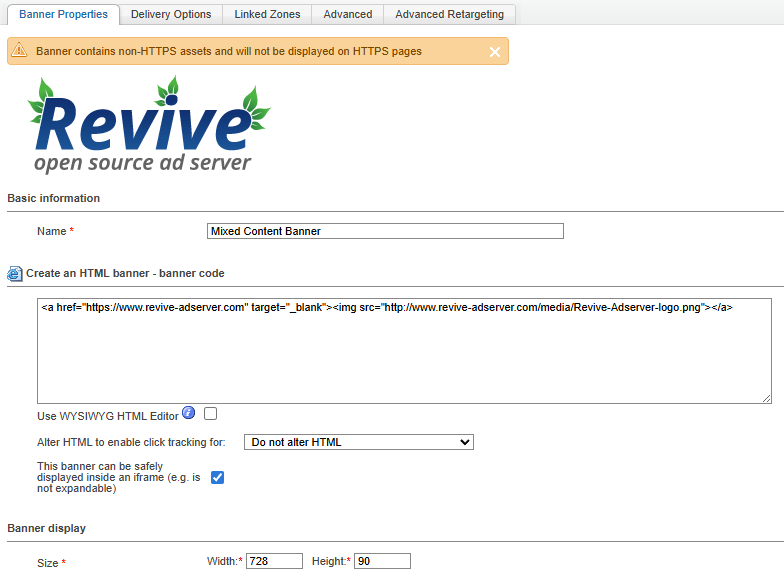
- We added a warning message in the banner edit screen when non-HTTPS assets are used, which would cause the banner to be ineligible for delivery on HTTPS pages.
- We ensured compatibility with PHP 8.1 all the way up to PHP 8.5
Optimized database queries for faster on-screen statistics
Sometimes, especially on large databases, it can take a while before a report appears on the screen. In Revive Adserver v6, we improved a number of these reports by optimizing the database query that’s running in the background. Some reports improved by a factor of 100, when we ran them through some internal benchmarks.
There are many factors at play that affect how quickly a report will appear on your screen, but at least now the bottleneck is no longer in the application’s code itself.
Loading animation for slow-loading pages
We understand that it can be frustrating if you’re working in your ad management environment and pages are loading slower than you’d like. It makes you wonder if something could be broken, or that perhaps it’s just a matter of being patient.
One of the reasons why the application can sometimes become a little bit slowed down is when you or a co-worker are running a report, and then when it doesn’t appear instantly, press or click Refresh in the browser. This will actually trigger another iteration of the same database operation to be added to the queue,, only aggravating the problem for everyone.
In Revive Adserver version 6 we added a subtle ‘loading’ animation that will appear when the next page takes a little time. The threshold is configurable, the default is 250 ms (a quarter of a second), and the animation can even be disabled completely if you don’t think it’s helpful.
Seeing the loading animation should help remind users to simply wait for the next page to be displayed. That way the ‘double query’ problem can be avoided, making the experience more smooth for everyone.
New Mailer plugin for use with an SMTP service or 3rd party mail provider
For as long as Revive Adserver has been around, emails like password resets or weekly statistics have always been sent by invoking the relevant outbound mail service on the server.
However, that has a few drawbacks.
- First of all, not every server has a mailout service enabled.
- Secondly, especially when using shared hosting, there is always a non-zero risk that the server’s IP address gets flagged as ‘spam’.
- And thirdly, especially in larger or corporate hosting environments, there might be a requirement to use an external mail sending service for reasons of scalability.
With Revive Adserver v6, we’ve bundled a new “Mailer” plugin, which can be configured to hand off outbound emails to either an SMTP service or an external 3rd party mail provider. The new Mailer plugin will automatically be added to the installation while updating to version 6.
See https://www.revive-adserver.com/how-to/configure-mailer-plugin/ for the instructions on how to configure and enable the plugin.
Banner file size limit to prevent uploading extremely large banner images
While creating a new banner or updating an existing one, you can upload an image to be displayed on your website or app. It’s not uncommon for advertisers or ad agencies to hire a designer to create these images. The designer might create beautiful images, but forget to keep in mind that these images will be used for web advertising. The unintended result could be that high resolution images with very large file sizes are provided for relatively small image dimensions.
In Revive Adserver, there was never any limit for the file size that could be uploaded as a banner. With version 6, there is now an optional file size limit that can be specified in the Configuration tab under “Banner Storage Settings”.
See https://www.revive-adserver.com/how-to/limit-banner-image-file-size/ for instructions on how to set a file size limit.
Warning message when creating or editing mixed content banners
While creating or editing banners in Revive Adserver, especially in HTML banners, the user can include non-secure content (i.e. material with a URL that starts with http://) in a banner that’s supposed to be displayed on a security website (i.e. starting with https://).
Since modern browsers block non-secure content from being displayed in a secure environment, this also means that Revive Adserver will not select a banner with non-secure content when the ad request comes in from a secure page.
This is referred to as ‘mixed’ content, so a banner that contains both secure and non-secure content.
We’ve noticed that users sometimes accidentally include non-secure content in banners, for example when using copy/paste.
Starting with Revive Adserver v6.0, the ad managing UI will show a warning message when the user saves a banner that has mixed content, so that it can be checked and fixed before it affects actual campaigns.
PHP compatibility
Revive Adserver is an application written in the well-known PHP programming language. Just like Revive Adserver, that language is an open source project, and it sees regular updates to keep up with developments and requirements presented by the internet, evolving standards, and security best practices.
At the time of writing this blog post, PHP had just released their newest version 8.5.0 of the language on November 20, with PHP 8.4 and 8.3 still officially being supported for some time. Their support for PHP 7.4 ended in December 2022, and for PHP 8.0 in December 2023. PHP 8.1 and 8.2 currently only receive security fixes.
All in all, this means that users of applications written in PHP, such as Revive Adserver, should aim to start using PHP 8.4, and start planning to update to PHP 8.5 soon.
Ever since v5.4.0, released in April of 2022, Revive Adserver has been compatible with PHP 7.2.5 or later, up to PHP 8.1.x. As a result, the last version before v6 was released, version 5.5.3, was compatible only with legacy versions of PHP that were no longer actively supported by the PHP development community.
The bulk of the work involved in creating version 6.0 of the Revive Adserver software, was related to compatibility with more recent and current versions of PHP. Most if not all of this is supposed to be completely invisible to our users, it should just work.
The work focused on ensuring that Revive Adserver v6.0 would work well and take full advantage of PHP 8.4, and also attempted to ensure compatibility with PHP 8.5, even though that was still under active development at the time.
Example update path
Let’s follow an example of a scenario where an organization is currently running Revive Adserver v5.5.x on an environment with PHP 7.4. This is not uncommon, since hosting providers and Linux distributions sometimes are somewhat behind on providing the latest version of PHP.
- The first step would be to update the server from PHP 7.4 to PHP 8.1, since Revive Adserver v5.5.x runs just fine on PHP 8.1. This step might actually involve migrating to another Linux distribution or server, if the existing server can’t support PHP 8.1.
- Once the server offers PHP 8.1, the next step is to update Revive Adserver from version 5.5.x to version 6.0.x, since the latest version of Revive Adserver can also run on PHP 8.1.
- Once Revive Adserver v6.0.x is there, the third and final step is to update PHP to v8.4, and eventually to v8.5 perhaps.
By taking these three steps, the end result is that the system is running with the most recent and stable version of Revive Adserver, on a server with a supported version of PHP.
It should be noted that Revive Adserver v5.5.x, running on a legacy system with PHP 7.4 (for example), can not simply be updated to v6.0.x, since that can’t run on PHP 7.4. The steps outlined above can be followed instead.